

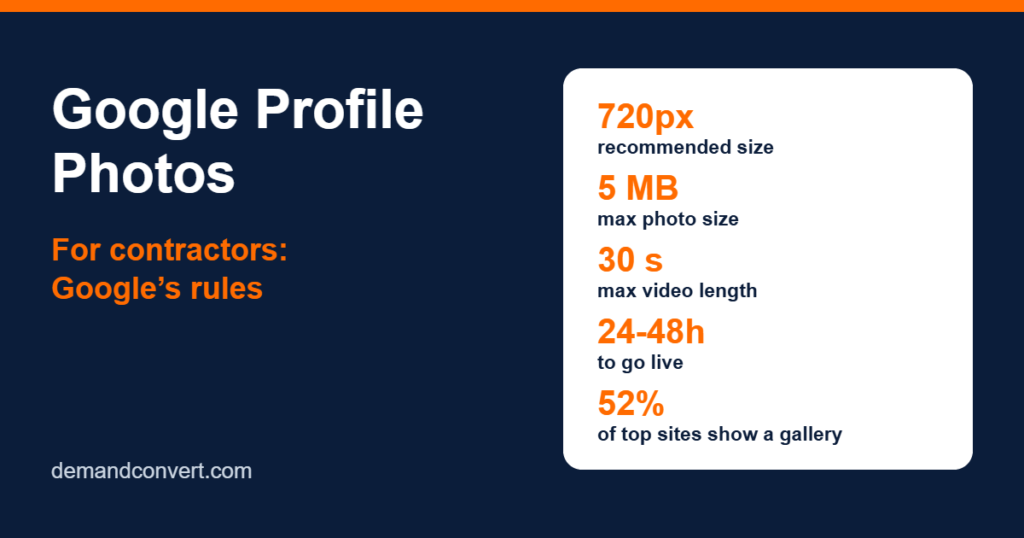
Short answer: Contractors should add real job site photos to their Google Business Profile: before-and-afters, the crew, the trucks and finished work, taken in good light and not heavily filtered. Google asks for JPG or PNG files between 10 KB and 5 MB, recommends 720 × 720 pixels, and reviews each photo before it goes live, which can take 24 to 48 hours. Google’s photo help page says nothing about location data in the file, so don’t count on geotagging. Count on steady, real photos instead.
Key takeaways
- Google’s rules: JPG or PNG, 10 KB to 5 MB, 720 × 720 recommended, 250 × 250 minimum, in focus and not heavily edited.
- Videos: up to 30 seconds, 75 MB, 720p or higher.
- Your chosen cover photo isn’t guaranteed to show first. Google may pick a customer photo if yours is low quality.
- Only half the page-one contractor sites we checked (52%) linked a gallery of their work, so real photos still stand out.
- One phone photo routine, used on every job, feeds your Google profile, website and social media.
What Google says about Business Profile photos
From Google’s Business Profile photo and video help page, read November 15, 2026:
| Item | Google’s guideline |
|---|---|
| Photo format | JPG or PNG |
| Photo size | 10 KB to 5 MB |
| Resolution | 720 × 720 pixels recommended, 250 × 250 minimum |
| Quality | In focus, well lit, no big alterations or heavy filters. It should “represent reality”. |
| Video | Up to 30 seconds, up to 75 MB, 720p or higher |
| Review | Each photo is checked against Google’s policies. It shows as Pending, Not approved or Live, and can take 24 to 48 hours. |
| Cover photo | You can set one, but it may not show first. A customer photo may be used if yours is low quality. |
| Verification | Photos only show after your profile is verified. |
Do geotagged photos help your ranking?
Google’s photo help page lists format, size, resolution and quality. It doesn’t mention GPS or location data in the photo file. Google’s ranking help page names relevance, distance and prominence as the main factors. So spend your time on real, frequent photos and reviews, not geotagging tools. See what 400 contractor listings show about ranking on Google Maps.
How few contractors show their work
On November 15, 2026, we checked the homepages of 61 local contractor businesses ranking on page one of Google for 20 trade and city searches. Here’s how many linked to places that show their work:
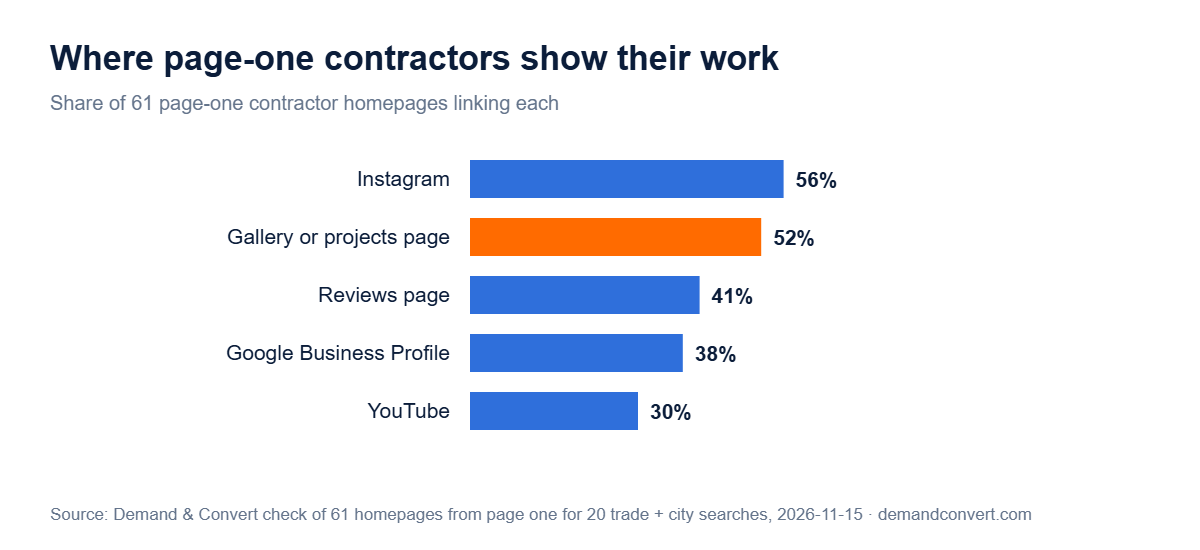
Even among top-ranking contractors, about half don’t link a gallery of their own jobs. A steady flow of real photos is an easy way to look more established.
What to photograph on every job
- Before: the problem, from the same spot you’ll shoot the after.
- During: the crew at work, in uniform, with the truck in view if you can.
- After: the finished job, in daylight, from the same angle as the before.
- Details: the brand of equipment or materials, a clean cut or seam.
- A 15 to 30-second video: a quick walk-around of the finished job.
Ask the homeowner before photographing their home, and leave out house numbers, faces and car plates unless they agree.
Want to go beyond photos? See job site videos vs stock photos for contractors.
Example: a weekly photo routine
Example only: a made-up landscaping company with 2 crews.
| Who | When | What |
|---|---|---|
| Crew lead | Every job | Before, after and one crew photo, sent to a shared phone album |
| Office | Monday | Pick the best 3 to 5, add them to Google Business Profile with a short caption of the job and town |
| Office | Wednesday | Post one before-and-after to Facebook and Instagram |
| Office | Monthly | Add the best jobs to the website gallery and the matching service page |
Mistakes to avoid
- Stock photos. Google asks for photos that represent reality, and homeowners can tell.
- Heavy filters or text over photos. They can look like ads and may not be approved.
- Uploading everything once, then nothing for a year. Your newest media shows first, so keep adding.
- Ignoring customer photos. Check them, and ask Google to remove any that break its policies.
Next steps
- Set up the rest of your profile: what the map pack winners do.
- Turn photos into posts with the 50/30/20 rule for social media.
- See how we run social media marketing for contractors from your crew’s photos.
Frequently asked questions
What size should Google Business Profile photos be?
Google asks for JPG or PNG files between 10 KB and 5 MB, recommends 720 × 720 pixels and accepts a minimum of 250 × 250. Photos should be in focus, well lit and not heavily edited.
Do geotagged photos help Google Business Profile ranking?
Google’s photo help page doesn’t mention location data in photo files, and its ranking page names relevance, distance and prominence. Real, regular photos and reviews are a better use of your time.
Why isn’t my cover photo showing first?
Google says setting a cover photo doesn’t guarantee it shows first. If it’s low quality or other sources suggest a better photo, Google may use a customer photo instead.
How long do Business Profile photos take to show?
Up to 24 to 48 hours, according to Google. Photos are reviewed first, and they only show once your profile is verified.
What photos should a contractor post?
Before-and-afters from the same angle, your crew at work, your trucks and finished jobs in daylight, plus short videos of up to 30 seconds. Ask homeowners before photographing their homes.
Keep reading
This guide is part of our Growing on Social Media series. Want us to handle this for your business? See our service: Social Media Marketing for Contractors .
More from Growing on Social Media:
- How to Market a Contracting Business on Social Media: What 61 Top Sites and 229 Ads Show (2026)
- Hashtag Research for Contractors: Each Platform’s Own Rules (2026)
- Social Media Scheduling Tools for Contractors: 14 Compared, Including Google Business Profile (2026)
- Social Media Management Pricing for Contractors: What 15 Agencies Charge (2026)
- The 50/30/20 Rule for Social Media: A Contractor’s Version (2026)
