

Short answer: a Google Business Profile is the free listing that puts a contractor on Google Maps and in the map results at the top of local searches. To make it work, claim and verify it, use your real business name, pick the primary category the businesses already winning your searches use, set an honest service area, fill in services, hours and photos, and ask every customer for a review. We looked at the profiles of 60 contractors in Google’s top 3 map results across 20 cities. In 16 of the 20 searches, all three used the same primary category.
Key takeaways
- Your primary category matters more than almost any other field. In 16 of 20 map packs we checked, all three winners shared one.
- The right category isn’t always the words customers type. For “garage door repair,” all three winners were listed as “Garage door supplier.” For “flooring installer,” all three were “Flooring store.”
- Use your real business name. Google’s rules forbid adding keywords, taglines or phone numbers to it.
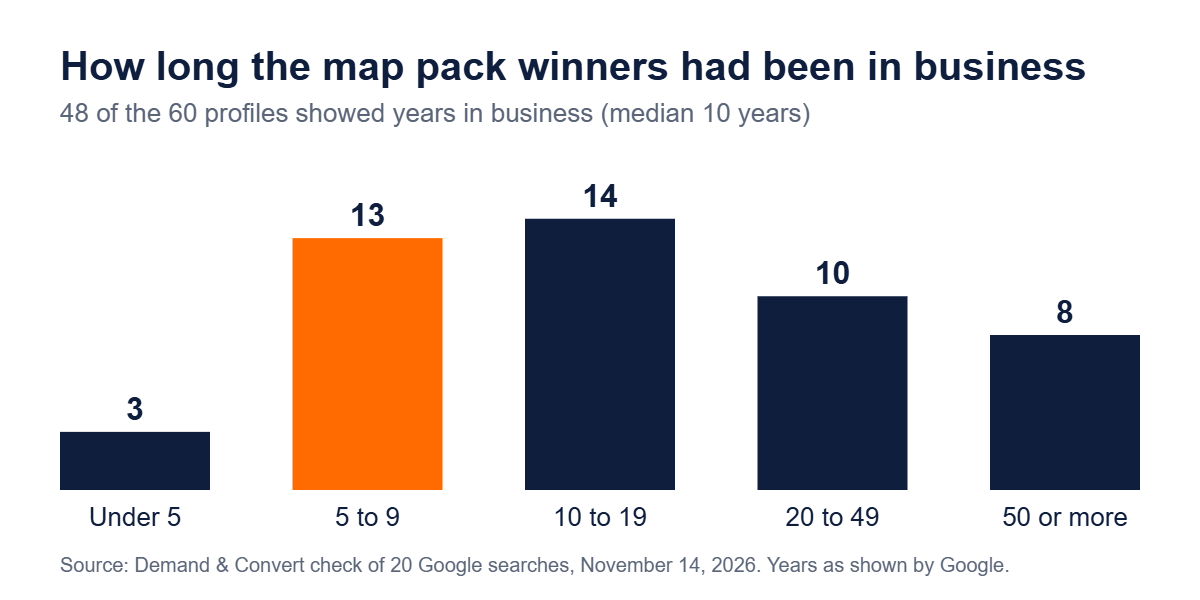
- You don’t need decades in business. Of the winners that showed an opening date, 16 had been open less than 10 years, and some only 3.
- Ask every real customer for a review. Google bans paying for reviews or only asking happy customers.
What a Google Business Profile does for a contractor
When someone nearby searches “roofer” or “water heater repair,” Google shows a map with three businesses before the regular results. Those three come from Business Profiles. The profile is also what shows on Google Maps, with your reviews, hours, photos, a call button and directions. It’s free, and for most contractors it brings more calls than any other single page on the internet.
The profile is one part of local SEO. Our guide to local SEO for contractors covers how it works with your website, reviews and listings. This guide is about the profile itself.
What we found in 60 map pack profiles
On November 14, 2026, we searched Google for 20 trades in 20 US cities, like “plumber in Phoenix, AZ” and “excavation contractor in Boise, ID.” For the first three businesses in each map, leaving out ads, we wrote down what Google showed: the primary category, the name, the years in business, the hours and whether there was a booking button.
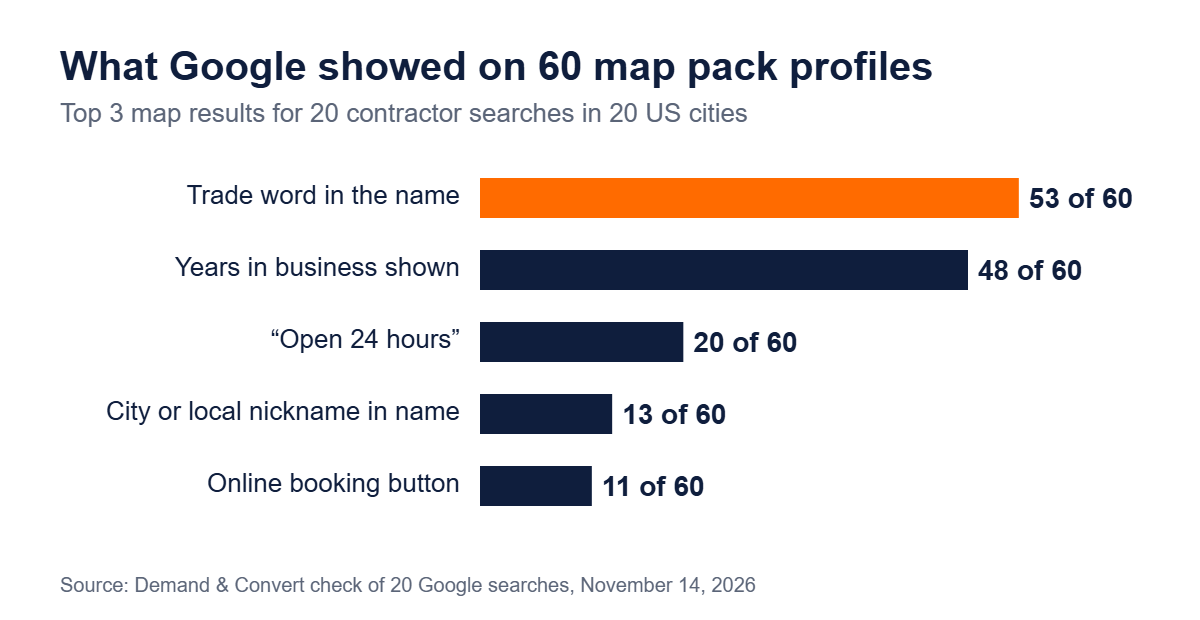
The category was the clearest pattern. Here is what the top three used in each search:
| Search | Primary category of the top 3 |
|---|---|
| Plumber, Phoenix, AZ | Plumber (all 3) |
| Electrician, Columbus, OH | Electrician (all 3) |
| Roofing contractor, Dallas, TX | Roofing contractor (all 3) |
| HVAC company, Atlanta, GA | HVAC contractor (all 3) |
| Landscaping company, Charlotte, NC | Landscape designer (2), Landscaper (1) |
| Tree service, Nashville, TN | Tree service (all 3) |
| House cleaning service, Denver, CO | House cleaning service (all 3) |
| Pest control, Tampa, FL | Pest control service (all 3) |
| Garage door repair, Las Vegas, NV | Garage door supplier (all 3) |
| Painting contractor, Kansas City, MO | Painter (2), Painting (1) |
| Home remodeling contractor, Minneapolis, MN | Construction company (2), Kitchen remodeler (1) |
| Deck builder, Raleigh, NC | Deck builder (all 3) |
| Paving contractor, Indianapolis, IN | Paving contractor (all 3) |
| Foundation repair, San Antonio, TX | Concrete contractor (2), Foundation (1) |
| Water damage restoration, Sacramento, CA | Water damage restoration service (all 3) |
| Window replacement company, Portland, OR | Window installation service (all 3) |
| Pressure washing, Jacksonville, FL | Pressure washing service (all 3) |
| Solar installer, San Diego, CA | Solar energy company (all 3) |
| Excavation contractor, Boise, ID | Excavating contractor (all 3) |
| Flooring installer, Louisville, KY | Flooring store (all 3) |
What this means for you:
- Copy the category, not the wording. In 6 of the 20 searches, the winning category wasn’t the phrase people typed. Google picks from its own fixed list, and the closest match on that list is what wins. Search your main service in your town and look at the category under each of the top three names.
- Age helps, but it isn’t required. 48 of the 60 showed years in business. The middle one had 10, and 16 had fewer than 10. That number comes from the opening date on your profile, so fill it in.
- 24-hour hours only if you mean it. 20 of the 60 showed “Open 24 hours,” mostly plumbers, HVAC, pest control, garage door and water damage companies. If you really take emergency calls at 2 a.m., say so. If not, don’t.
- Booking buttons are still rare. Only 11 of the 60 showed a Schedule button. If your scheduling software can connect to Google, it’s an easy way to stand out.
How to set up your Google Business Profile, step by step
- Search for your business first. If a profile already exists, claim it instead of making a new one. Duplicate profiles split your reviews and can get both suspended.
- Use your real name. Enter it exactly as it appears on your truck, signs and invoices. No city, no “Best,” no phone number.
- Pick your primary category using what you found in your own map pack. Add a few extra categories only for other work you really do, like “Gutter cleaning service” for a roofer who cleans gutters.
- Set it up as a service-area business if customers don’t come to you. Hide your address and list the cities or zip codes you drive to.
- Add a local phone number you control and the website page that fits best. For a one-location contractor, that’s usually your homepage.
- Verify. Google chooses the method: a phone call or text, email, a video call or a postcard. Don’t change your name, address or category while you wait.
- Fill in everything else: hours, opening date, services, a plain description of what you do and where, and photos.
- Add a second owner or manager, such as your office manager, so one person leaving doesn’t lock you out.
Google’s rules for each field
Most profile problems come from breaking a rule without knowing it. These are from Google’s own help pages, read on November 14, 2026.
| Field | Google’s rule | Source |
|---|---|---|
| Business name | Your real-world name as used on signs and branding. No taglines, phone numbers, web addresses or extra keywords. | Guidelines |
| Address | A real, precise address. No P.O. boxes or virtual offices. Service-area businesses hide it. | Guidelines |
| Service area | One profile for the whole area, generally within about 2 hours’ drive of your base. | Guidelines |
| Phone | A local number under your direct control. | Guidelines |
| Categories | One primary category, as specific as possible, and only a few more. Pick what your business is, not what it has. | Categories |
| Description | No links, prices or sales offers. | Description |
| Photos | JPG or PNG, 10 KB to 5 MB, ideally 720 × 720 pixels. In focus, well lit, not heavily edited. New photos can take 24 to 48 hours to show. | Photos |
| Verification | Google picks the method. Postcard codes usually arrive within 14 days and expire after 30. | Verification |
| Reviews | No payment, discounts or free work for reviews. Don’t ask only happy customers, don’t discourage bad reviews, and don’t write reviews for yourself. | Review policy |
Photos that help a contractor’s profile
Homeowners want to see real work and real people. Add photos of finished jobs, before-and-afters, your crew in uniform and your trucks with the logo showing. Use your own photos, not stock images. A phone photo taken in daylight is fine. Add a few every month so the profile looks active, and add a short video of a job if you have one (Google allows up to 30 seconds).
Reviews: ask everyone, the right way
Google allows you to ask real customers for reviews and suggests sharing a review link or QR code. What it doesn’t allow is offering anything in return, asking only the customers you know are happy, or telling people what to write. Text your review link the day you finish the job, and reply to every review, good or bad, in a calm, short sentence or two. Our post on getting more Google reviews covers timing and wording, and our pillar guide shows how many reviews the businesses in 20 map packs had.
Keeping the profile current
A simple monthly routine is enough for most contractors:
Your profile’s name, address and phone should match your website and your other listings. See what we found when we checked NAP consistency on 57 map pack leaders.
- Add new job photos.
- Post an update about a recent job, a seasonal service or a holiday schedule.
- Set holiday hours before each holiday.
- Reply to every new review.
- Check that nobody has suggested an edit that changed your hours, phone or category.
- Look at the performance numbers in the profile (calls, website clicks, direction requests) to see what’s changing.
For how the profile, reviews and website work together to move you up the map, see our guide on how to rank higher on Google Maps.
Mistakes that hold contractors back
- A category that matches your words but not Google’s list. Check what the winners in your town use.
- Keywords in the business name. It breaks Google’s rules and can get the profile suspended.
- A home address showing when customers never come to it.
- Two profiles for one business, often from an old one nobody claimed.
- A different phone number on the profile, the website and your listings. Pick one and use it everywhere.
- A profile with no photos or a handful from years ago.
- Only one person with access, who then leaves the company.
If your profile or website still isn’t showing, see why your business isn’t showing up on Google for the full checklist.
Next steps
See how your profile and website stack up against the businesses beating you with our free competitor comparison. For trade-specific advice, pick yours from our local SEO playbooks by trade. If you’d rather have the profile, reviews and website handled for you, our Local SEO program starts with a 60-day free trial, and the territory checker shows whether your trade is still open in your area.
Frequently asked questions
Is a Google Business Profile free for contractors?
Yes. Creating, verifying and running a Google Business Profile is free. You don’t need to buy ads to have one, and Google says nobody can pay for a better local ranking.
Which Google Business Profile category should a contractor choose?
Choose the most specific category that describes what your business is, from Google’s list. Then check the businesses in the top three of your map results. In 16 of the 20 searches we checked, all three used the same primary category, and in 6 it wasn’t the phrase people searched.
Can a contractor without an office have a Google Business Profile?
Yes. Set it up as a service-area business, hide your address and list the cities or zip codes you serve. Google says the area should generally be within about 2 hours’ drive of where you’re based. P.O. boxes and virtual offices aren’t allowed.
Can I put my city or trade in my Google Business Profile name?
Only if it’s part of your real business name, as shown on your signs and paperwork. Google’s guidelines don’t allow adding keywords, taglines or locations to the name, and doing it can get the profile suspended.
How long does Google Business Profile verification take?
It depends on the method Google gives you. Phone, text, email and video can be quick, and Google says reviews of your verification can take up to 5 business days. Postcard codes usually arrive within 14 days and expire after 30.
Keep reading
This guide is part of our Getting Found on Google Maps series. Want us to handle this for your business? See our service: Local SEO for Contractors .
More from Getting Found on Google Maps:
- NAP Consistency and Local Citations for Contractors: What 57 Map Pack Winners Show (2026)
- How to Rank Higher on Google Maps: What 400 Contractor Listings Show
- Win Summer Before It Starts: The HVAC Q2 Growth Playbook
- How to Get More Google Reviews as a Contractor (Without Breaking Google’s Rules)
- The Summer Surge: Why Your Electrical Company is Invisible When Buyers Need You Most
